One of my favorite alerts from the open source EDR I’ve been building this
year is a high-severity “Suspicious exec chain.” At the top of the chain is my AI coding assistant. It spawned
/bin/bash, and seconds later that shell opened an outbound HTTPS connection.
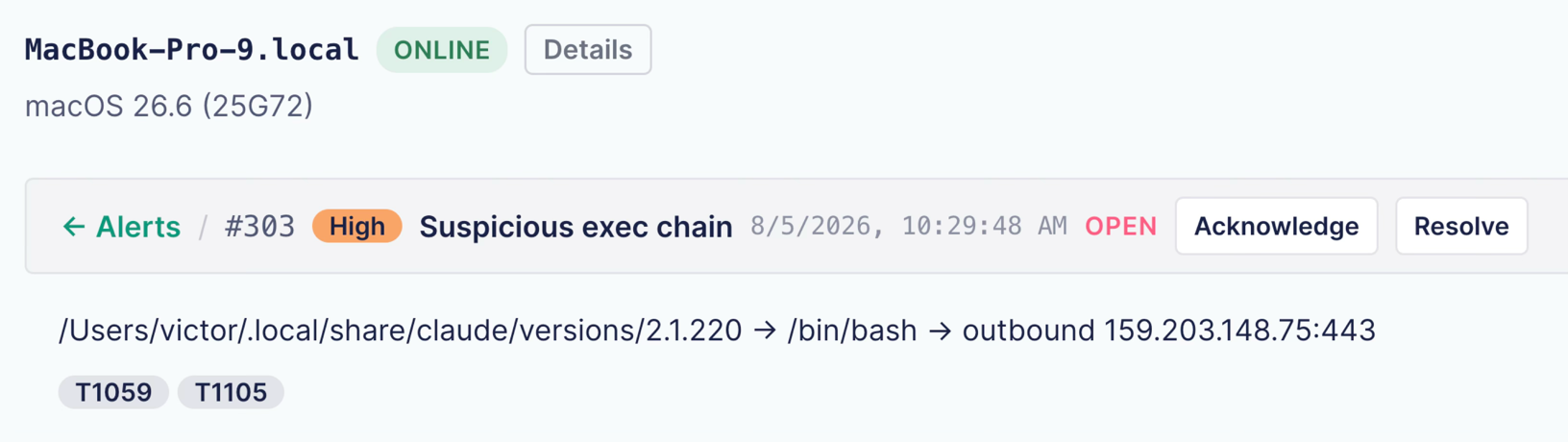
That’s my AI coding assistant doing its job. It takes instructions from a server somewhere, runs shell commands on my Mac, and sends the results back. In a reverse shell, code on a compromised machine starts a shell and connects it out to an attacker, who then runs commands through it remotely. My AI agent isn’t doing that. But to the rule that flagged it, it looks exactly like one, because the events it sees have the same shape. At one point, a quarter of my alerts were this one tool. Same shape as the attack. But, hopefully, completely innocent.
That alert says a lot about what EDR vendors call behavioral detection, and why it’s both simpler and harder than the marketing suggests.
A detection is a shape across time
EDR stands for Endpoint Detection and Response. It includes an agent on each machine that watches what the operating system is doing and can sometimes act on it. On macOS, Apple’s Endpoint Security and Network Extension frameworks give that agent a stream of security-relevant facts. A process started. A file was written. A connection went out. Millions of them, every day. On their own, most of these events don’t mean much. A program started a shell. Is that an attack? Apple doesn’t say. Someone has to decide which patterns of ordinary events are worth waking a human for.
Take the reverse shell. A program starts a shell: normal, happens constantly. A shell opens a network connection: also normal. But what about a program that isn’t a shell, spawning a shell, that then reaches out to the internet seconds later, in that order? That’s more interesting. It looks like something ran, and then called home.

So a detection isn’t one scary event. It’s a shape drawn across several ordinary ones and held together over time. In my rule, the shell or one of its children has to connect out within 30 seconds. And it is a suspicion, not proof.
A lot of behavioral detection is an if-statement
“Behavioral detection” sounds like there’s an intelligence in there, reasoning about intent. In practice, the term covers everything from statistical models to a rule somebody typed. Many products layer reputation scores, anomaly models, and cloud analytics on top. But a great deal of what actually fires on your fleet is code a human wrote that effectively says: this pattern of events is suspicious.
Here’s a real rule, straight out of my repo, with the comments removed. It’s written in Sigma, an open text format for detections, and it catches one piece of the behavior above: Microsoft Office spawning a shell.
detection:
  selection_shell:
    Image|re: '^(/bin/sh|/bin/bash|/bin/zsh|/bin/dash|/usr/bin/sh|/usr/bin/bash|/usr/bin/zsh|/usr/bin/dash)$'
  selection_office:
    ParentImage|re: '^(/Applications/Microsoft Word\.app/Contents/MacOS/Microsoft Word|/Applications/Microsoft Excel\.app/Contents/MacOS/Microsoft Excel|/Applications/Microsoft PowerPoint\.app/Contents/MacOS/Microsoft PowerPoint|/Applications/Microsoft Outlook\.app/Contents/MacOS/Microsoft Outlook)$'
  condition: selection_shell and selection_office
Two conditions and an AND. That’s the entire rule. You could read it in a code review. You could write one yourself over lunch. The full reverse shell rule is more involved, because Sigma can’t walk a process tree for 30 seconds, so that logic lives in Go code. But that code is public too. And that gives a rule a very useful property: you can read it. You can test it. You can argue with it.
Writing the rule took an afternoon. Taming it has taken months.
I’m not saying detection is easy. Writing the reverse shell rule was easy. Making it fire only on the things you’d actually want to be woken up for has taken months, and I still haven’t finished. Plenty of legitimate software looks exactly like an attack. Build tools spawn shells and hit the network. IDEs do. Package managers do it by design. So do Installomator, your device management agent, and now AI coding agents. Every vendor does this tuning work. And you do the same thing every time you add an exclusion.
Every broad exception is an evasion path
The obvious fix for my AI assistant alert doesn’t work. I can’t simply tell the rule to ignore that shell, because the shell is bash. Plain old bash. If I blind the rule to bash, I’ve blinded it to the real attacks that also use bash. That’s the trap: every broad exception creates an evasion path. What I can do is write a narrow exception tied to one specific signed binary, by its code signing team ID. That takes a lot longer, and it’s much harder for an attacker to imitate.
There are two ways to get a rule wrong, and they’re opposites. A broad rule fires on everything, and a tired security team starts muting such rules. A brittle rule keys on something shallow: a filename, a string, one event with no context. It almost never raises a false alarm. But when the attacker changes one detail, the rule stops matching, and nothing tells you it stopped.
My own reverse shell rule had exactly that hole. Swap bash for zsh, and zsh replaces itself with the payload and vanishes from the process tree the rule was walking. Same attack, but invisible. I fixed that hole. But a rule you can dodge by changing one word was brittle to begin with. So the useful question isn’t whether a rule can be evaded. It’s what evading it costs.
Rule count isn’t coverage
This is also why a big detection count doesn’t mean much. It tells you nothing about how many rules are good, tuned for a fleet like yours, or even working. CardinalOps tracks this for SIEM detection rules every year. Their 2025 report found that 13% of rules in production environments were broken and would never fire. The year before, it was 18%. Not tuned badly. Broken. A quiet alert queue doesn’t prove much either, because a brittle rule is quiet too. What you want to know is whether the rules that should fire actually do, and how many of the alerts that reach your team are real.
And even a rule that works still has to be believed when it fires.
A correct alert can still be argued away
In March 2023, a North Korean-linked actor trojanized the 3CX desktop app and shipped it through the vendor’s own update channel. The builds carried 3CX’s own signature. The macOS build was even notarized by Apple, so the Mac’s signing and notarization checks let it run. Notarization means Apple’s automated scan found nothing it knew to be malicious. It doesn’t mean the app is safe.
What fired was behavioral detection, on the Windows side. On March 22, a week before the compromise was confirmed, a customer posted SentinelOne alerts from the Windows app on the 3CX forum. The alerts named shellcode and code injection. The next day, another customer replied: “I added the exception for the signer id ‘3CX LTD’.” For about a week, customers and the vendor questioned the detector instead of the software. The identity of the software kept winning the argument against its behavior.


The lesson isn’t that a clever rule saved everybody. It’s that trusted software can also behave maliciously, and a correct alert can still be argued away when nobody can explain what produced it.
What to ask your EDR vendor
Which gives you one of the sharpest questions to ask an EDR vendor, in three parts. Can we inspect your detection content? Can we tune it? And can we export it, in Sigma or any documented format? While you’re at it, ask to see the exclusion list. It’s the map of where the product has decided not to alert, and sometimes not to look at all. You can’t judge coverage without it.
None of this is a fringe ask. Elastic publishes the detection rules its endpoint agent runs, and has run a bug bounty that pays researchers for bypassing its endpoint behavior rules. And if your EDR’s rules are a black box, then after an incident you can’t really tell your board why a detection fired, or why it didn’t. “The vendor’s engine decided” isn’t a root cause anyone accepts.
If the detection is an AI model rather than a rule, there may be nothing to inspect. So ask something related. When it fires, does it tell you which behavior triggered it? Can you tune it, or only turn it down?
My reverse shell detection has no cloud and no model. It’s two ordinary events joined by a rule you could read. That’s the standard I’d hold a vendor to: show me the events, show me the logic that fired, and let me change what doesn’t fit my environment. None of that requires open source. It just requires letting you open the box and look.
Further reading
Does your Mac fleet need an EDR?
A one-page decision worksheet for Mac admins who were handed an EDR quote and asked whether the fleet needs it.Why transparency beats everything else in engineering
Trust without visibility is fragile. The same argument this article makes about detection rules, applied to engineering teams.Code signing a Windows application
What a code signature proves: who published the software and that nobody altered it since. Not that it’s safe to run.Comprehension debt: the hidden cost of AI-generated code
Another side of AI coding agents: code that ships before the team can explain what it does.Open source EDR on GitHub
The open source macOS EDR behind this article, including every detection rule and the issues where they broke.
Watch the full talk
This article covers one idea from a longer conference talk on building an open source macOS EDR. The talk also gets into the DNS proxy that took my Mac offline, the agent that went blind while its dashboard stayed green, and the opinions Apple’s Endpoint Security framework builds into every Mac security tool.
Note: If you want to comment on this article, please do so on the YouTube video.